Classic Easter: Integrating a Vibrant Display Font into Your Creative Workflow
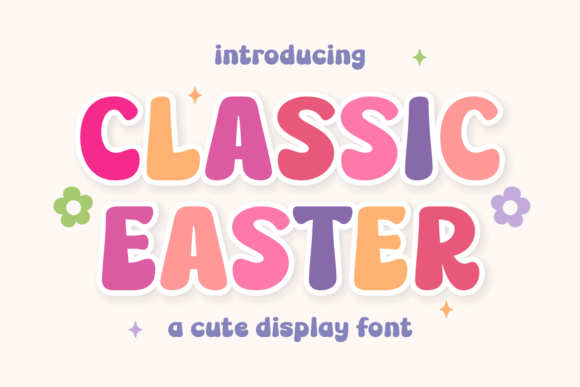
In the world of seasonal marketing and design, the right typeface does more than convey words—it establishes an immediate emotional connection. Classic Easter is a display font designed specifically to capture the vibrant, bouncy energy of spring. With its soft, bulbous forms and friendly “interlocking” feel, this typeface is built to spread joy. However, for professionals and creators, understanding the aesthetic is only half the battle. The real value lies in understanding how to implement this asset effectively within a broader design workflow, ensuring that it enhances project efficiency while delivering high-quality results.
This article explores the practical application of the Classic Easter typeface, moving beyond simple description to offer a process-oriented guide for marketers, designers, and business owners.
Understanding the Asset: Anatomy and Aesthetics
Before integrating any new asset into a project, a quality control assessment is necessary. Classic Easter is categorized as a “Sweet Bubbly Display” font. This classification dictates its usage; it is not intended for long-form body copy or technical documentation. Its design features rounded terminals and a playful baseline shift, which creates a sense of movement.
From a usability standpoint, the font performs exceptionally well in multi-color palettes. This is a critical observation for workflow planning. Because the letterforms are bulbous and open, they allow for gradient fills, textures, or solid color blocking without compromising legibility. For a designer, this means the font is compatible with complex layering techniques in software like Adobe Illustrator or Affinity Designer.
Strategic Placement in the Design Process
Integrating a specialized font like Classic Easter requires planning. It fits most naturally into the ideation and execution phases of a project, specifically for seasonal campaigns. Here is how to position this asset within your timeline:
Pre-Project Preparation
Before the design sprint begins, ensure the font files are installed and organized. For teams, this involves uploading the font to a shared asset library or a cloud-based design tool like Canva or Figma. During the mood boarding phase, identify if the project requires a "joyful" or "youth-oriented" aesthetic. If the brief calls for corporate minimalism, Classic Easter should be set aside. If the brief targets children’s apparel or festive social media content, it should be moved to the primary asset folder.
Execution and Typography Pairing
A common pitfall with display fonts is poor pairing. Because Classic Easter is bold and expressive, it requires a neutral counterpart to maintain hierarchy. In your workflow, establish a typographic scale early:
- Headlines: Use Classic Easter for the primary hook. Its interlocking nature makes it excellent for short, impactful statements.
- Sub-headlines: Use a clean sans-serif (like Montserrat or Lato) to provide context without visual competition.
- Body Copy: Stick to a standard serif or sans-serif for readability.
This approach ensures that the "bubbly" nature of the font enhances the design rather than overwhelming the message.
Practical Implementation: Workflow Examples
The utility of Classic Easter extends across various industries. Below are specific workflows for different user groups.
For Social Media Managers and Marketers
Seasonal marketing is time-sensitive. The efficiency of your content calendar relies on assets that are easy to deploy. Classic Easter is ideal for Instagram Stories, Reels covers, and Pinterest graphics promoting Easter sales.
Workflow Tip: Create a master template set in your preferred social media scheduling tool. Pre-load the Classic Easter font into text placeholders. When a flash sale or event arises, the team only needs to update the copy and color palette. Because the font works well with multi-color schemes, you can quickly swap out background colors to match different campaign segments (e.g., pastel yellows for general branding, vibrant greens for eco-friendly products) without redesigning the typography.
For Greeting Card Designers and Printers
In the niche of stationery and greeting cards, the tactile feel of the design is paramount. The "soft" forms of Classic Easter translate well to print, particularly on matte finishes where ink absorption can soften sharp edges.
Workflow Tip: When preparing files for print, pay attention to kerning. Display fonts with "bouncy" baselines often require manual adjustment to ensure the "interlocking" letters don't collide awkwardly in a physical print. Use the optical kerning setting in your layout software, then manually inspect the connection points between letters like 'o', 's', and 't'.
For Educators and Parents
Creating materials for children requires high legibility and engagement. Classic Easter is suitable for worksheets, party invitations, and classroom decorations.
Workflow Tip: If you are creating editable PDFs for a classroom, embed the font or convert the headers to outlines. This ensures that the joyful aesthetic is preserved regardless of the recipient's operating system. Use the font for section headers to break up the visual monotony of text-heavy worksheets, making the learning material feel more approachable.
Compatibility and Technical Considerations
A smooth workflow depends on technical compatibility. As a display font, Classic Easter is best used in vector-based environments or high-resolution raster projects.
- Color Management: Since the font is designed for multi-color palettes, ensure your color mode matches your output. Use CMYK for print projects to avoid unexpected color shifts in the vibrant pastels typical of Easter themes.
- Scalability: Because of its soft, bulbous forms, this font holds up well at large sizes. However, avoid using it at very small sizes (below 14pt) where the unique characteristics of the curves may become muddy or lost.
- File Formats: Ensure you have access to both OTF and TTF versions if you work across different software suites (e.g., moving between Adobe Creative Cloud and Procreate on an iPad).
Long-Term Use and Brand Consistency
While Classic Easter is a seasonal font, it can play a role in long-term brand strategy for businesses that rely heavily on Q1 and Q2 holidays. If you are a small business owner selling confectionery or spring apparel, this font can become a recognizable signature of your seasonal identity.
Implementation: Create a "Seasonal Brand Style Guide" supplement. Document the specific hex codes you pair with Classic Easter, the minimum size for usage, and the approved contexts (e.g., "Use for Instagram headers, do not use for email body text"). This documentation saves time in future years, allowing you to reactivate your Easter campaign assets with minimal friction.
Conclusion
Classic Easter is more than just a seasonal novelty; it is a functional design tool that, when integrated correctly, streamlines the creation of festive content. By understanding its technical strengths—specifically its compatibility with color palettes and its suitability for large-scale display use—you can incorporate it into your workflow to produce professional, high-energy designs. Whether you are drafting social media graphics, designing greeting cards, or organizing a community event, this typeface offers a reliable way to inject the spirit of spring into your projects.