Unwrapping the Magic of Bundling Package: A Festive Typeface for Holiday Designs
The holiday season brings a unique visual language—think of the intricate swirls on a gift box, the playful lettering on a vintage Christmas card, or the whimsical script on a festive invitation. Capturing that specific mood in your digital designs requires more than just a standard font. Enter Bundling Package, a typeface designed specifically to embody the cheer, nostalgia, and decorative flair of the holidays. It is not just a tool for typing; it is an instrument for setting a mood, adding that essential touch of enchantment to your greeting cards, gift tags, and seasonal marketing materials.
Understanding the True Nature of a Decorative Font
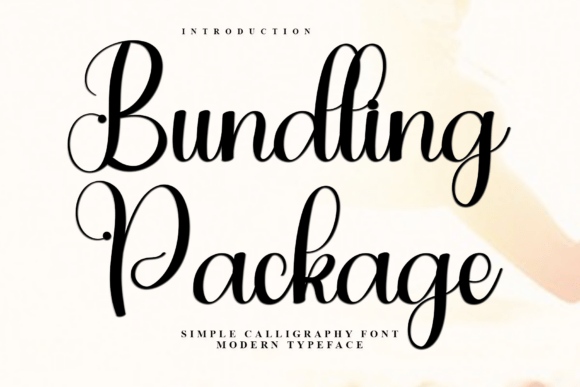
At its core, Bundling Package is what designers call a display or decorative typeface. Its primary strength lies in its personality. The letterforms often feature ornamental details, varying weights, and a whimsical flow that mimics hand-lettering or traditional holiday motifs. This makes it incredibly effective for headlines, logos, and short bursts of text where atmosphere is the priority.
However, a common misunderstanding arises when users treat decorative fonts like workhorse text fonts. One of the first hurdles for beginners is expecting a typeface like Bundling Package to perform well in long paragraphs. A frequent mistake is using this festive script for body copy in a newsletter or a website. While the first sentence might look magical, reading a full page of ornate, swirling text causes significant eye strain. The visual complexity that makes the font special becomes a barrier to readability when applied to dense information.
The Better Approach: Use Bundling Package strategically for impact. Reserve it for your H1 headers, subheadings, or pull quotes. Pair it with a clean, neutral sans-serif font for your body text. This contrast allows the festive nature of the design to shine without compromising the user experience. For example, on a holiday menu, use the decorative font for the dish titles, but a simple serif or sans-serif for the descriptions and prices.
Navigating the "PUA Encoded" Advantage
One of the standout technical features of Bundling Package is its PUA (Private Use Areas) encoding. For the uninitiated, this term can sound abstract, but it is practically significant. It means that the font includes special characters, glyphs, and ligatures that are not accessible via a standard keyboard. These are the flourishes—the extra swooshes, the stylistic alternates, and the unique letter combinations—that give professional designs that "custom-made" look.
The mistake here is overlooking these assets. Many users download the font, type out their text, and wonder why it looks somewhat standard compared to the promotional images. They miss out on the "magic" because they are unaware of how to access the hidden characters. If you ignore the PUA encoding, you are essentially buying a sports car and never shifting out of first gear.
How to Access the Magic: You need a design application that supports glyph selection, such as Adobe Illustrator, Photoshop, or even Microsoft Word (via the Insert Symbol function, though with some limitations). In Illustrator, for instance, you would open the "Glyphs" panel. From there, you can see the full inventory of Bundling Package. You can highlight a specific letter and swap it out for a stylistic alternate that might have a longer tail or a loopier connection. This is where the font transforms from "nice" to "stunning."
Avoiding Clashing Styles and Over-Decoration
When you have access to a font as festive as Bundling Package, there is a temptation to go overboard. This is the "kid in a candy store" syndrome. You might be tempted to use three different decorative fonts in one poster, or to apply every stylistic alternate available on a single headline. The result is often visual chaos where no single element stands out, and the message gets lost in the noise.
A cluttered design looks amateurish. If your typography is fighting for attention with your graphics, the viewer will simply scroll past. The goal is not to show off how many fonts you have, but to communicate a message clearly and beautifully.
Practical Advice on Composition: Treat Bundling Package as the star of the show, and give it a supporting cast. If you are designing a social media graphic for a Christmas sale, let the main headline use the festive font. Ensure there is plenty of "white space" or breathing room around the text so the decorative details don't get muddled. If you need a secondary font for details like dates or locations, choose something geometric and simple. Let the whimsy of Bundling Package set the tone, and let the layout bring the order.
Technical Checks Before You Commit
Before you finalize a project or purchase a license for Bundling Package, there are a few technical due diligence steps that professionals never skip. Beginners often skip these steps, leading to headaches later in the workflow.
- Character Support: Does the font support the language you are writing in? Bundling Package is designed with specific aesthetics in mind. You should check if it includes accented characters for European languages if you are targeting an international audience. Missing glyphs can result in empty boxes appearing in your text, which instantly breaks the immersion.
- File Formats: Ensure you have the correct file type (OTF or TTF) for your operating system. While modern systems handle both well, older software can sometimes be picky.
- Rendering on Screens: Highly decorative fonts can sometimes render poorly at very small sizes on screens, appearing blurry or jagged. Always test your design at the size it will be viewed. If you are using it for a website header, check it on both desktop and mobile devices to ensure the intricate details remain legible.
Matching the Font to the Brand Voice
Finally, consider whether Bundling Package aligns with the specific voice of the project. It is perfect for a children's Christmas play, a family bakery's holiday menu, or a whimsical e-commerce gift shop. However, if you are designing for a luxury law firm's corporate holiday card, the playful, perhaps cartoonish nature of a font like Bundling Package might send the wrong signal. It could undermine the authority and seriousness of the brand.
Context is everything. Just because a font is beautiful doesn't mean it is appropriate for every scenario. Ask yourself: Does this typography match the emotion I want my audience to feel? If the answer is "cheerful, nostalgic, and magical," then Bundling Package