Why Ferry Might Be the Wrong Choice: Avoiding Costly Design Mistakes
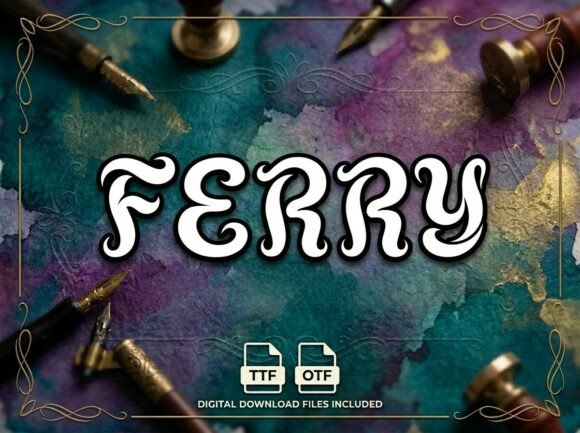
You’ve seen Ferry before, even if you didn’t know its name. It’s that bold, artistic display font that makes a logo pop off the screen or gives a poster an undeniable personality. It’s designed to be the center of attention, and when used correctly, it delivers a stunning visual punch. But here’s the catch that trips up so many designers and entrepreneurs: its greatest strength is also its most common pitfall. Choosing a font based purely on its visual flair without understanding its technical DNA is a fast track to a frustrating, unprofessional result.
The primary misunderstanding revolves around its core characteristic: Ferry is an all-caps, uppercase-only display typeface. This isn't a minor detail buried in the fine print; it's the fundamental rule of engagement. It means the font contains no lowercase letters. Every character is a capital. This design choice is intentional, creating a powerful, uniform, and impactful aesthetic perfect for headlines, logos, and decorative initials. However, this is precisely where many projects go wrong. Someone falls in love with the look, purchases the font, and then tries to use it for a paragraph of body text or a lengthy brand name that requires mixed-case readability. The result is a wall of identical, shouting capitals that is exhausting to read and fails to communicate effectively.
This mistake directly impacts presentation and communication. Imagine a bakery using Ferry for its menu descriptions. "FRESHLY BAKED SOURDOUGH AND CROISSANTS" loses all nuance and flow. It feels aggressive rather than inviting. The solution isn't to avoid the font, but to apply it with intention. Use it for the main headline—"The Artisan Bakehouse"—where its boldness commands attention. Then, pair it with a highly readable, neutral sans-serif or serif font for the body copy that explains the details. This creates a visual hierarchy: Ferry grabs the eye, and the secondary font holds the attention and delivers the message clearly.
The File Format Dilemma: OTF vs. TTF
Another area where creators often make a poor decision is in file selection. Ferry typically comes with two standard files: an OTF (OpenType Font) and a TTF (TrueType Font). Beginners might think, "They look the same, I'll just grab the TTF for its universal compatibility." This is a classic oversight. While TTF files work on virtually any device or basic design software, the OTF file is the professional standard. It contains more advanced typographic features and is built for sophisticated layout software like Adobe Illustrator, InDesign, or Affinity Designer.
Choosing the TTF over the OTF can limit your efficiency and the final quality of your work. OTF files often include OpenType features like stylistic alternates (swashy versions of letters), ligatures (special combined characters), and more precise kerning (spacing between letters). If you're using Ferry for a high-end logo or a creative packaging project, you might want to access a unique alternate 'R' or a special 'Th' ligature to add that extra layer of artistry. With a TTF, those options are simply unavailable. The better approach is simple: always install and use the OTF file if your software supports it. Reserve the TTF for situations where you need to ensure compatibility with very basic systems or for embedding in certain web environments where OTF support might be inconsistent.
Practical Checks Before You Commit
Before you even download Ferry, run through this quick mental checklist to avoid buyer's remorse and wasted time.
- Audit Your Actual Need: Be brutally honest. Do you need a font for long-form text, or for high-impact, short bursts of text? If 90% of your project is body copy, Ferry is a supporting actor, not the lead. You'll need a primary workhorse font first.
- Test Your Words: Use the font preview tool on the sales page to type out your specific headline or brand name. Does every letter exist? Does the combination of letters feel balanced and readable in all-caps? Some words can look awkward when every character is a capital.
- Consider the Licensing Context: Font licenses can be tricky. Will you be using this for a personal blog, a client's commercial product, or a merchandise line? Ensure the license you purchase covers your intended use to avoid legal and cost issues down the road.
Think of a better approach: You're designing a logo for a new coffee roaster, "Ember & Oak." You love Ferry's strong personality. Instead of forcing the entire name into the font, you could use Ferry just for the ampersand "&" or the initial letters "E" and "O" as decorative monograms. Then, set the full words "Ember" and "Oak" in a clean, complementary font. This strategy leverages the font's artistic strength without sacrificing the legibility of the core brand name. It shows thoughtful, professional design.
Making Ferry Work for You
The goal isn't to be scared off by Ferry's limitations, but to be empowered by its specific strengths. Its lack of lowercase letters is a feature, not a bug—it forces a certain aesthetic discipline. To use it effectively:
- Pair it Wisely: Match it with a simple, clean font for contrast. A geometric sans-serif like Montserrat or a classic serif like Lora can provide excellent balance.
- Use it Sparingly: Let it shine in headlines, subheads, pull quotes, or as a logo element. Avoid using it for any text that requires detailed reading.
- Leverage its Personality: Its artistic, hand-crafted feel is perfect for brands related to art, design, boutique retail, craftsmanship, or creative services. It might feel out of place for a corporate law firm or a medical institution.
Ultimately, a great font is a tool, and Ferry is a specialized one. It's the chisel for creating a sharp, impactful edge, not the sandpaper for smoothing over large surfaces. By understanding its all-caps nature, choosing the right file format, and applying it with strategic restraint, you can avoid common pitfalls and harness its true power. The result will be design work that feels intentional, polished, and visually compelling—exactly what you were aiming for when you first saw the font and felt its potential. Make the informed choice, and let Ferry do what it does best: make a bold, unforgettable statement.