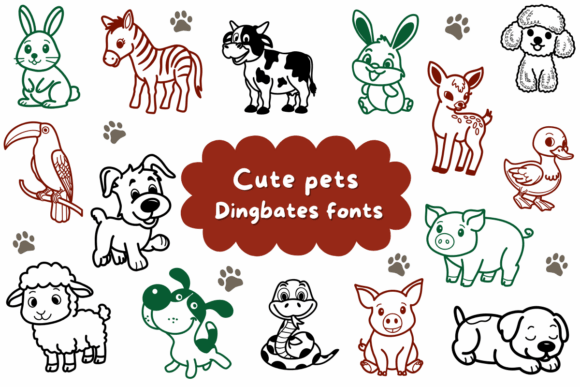
Unleash Creative Charm with Cute Pets Dingbats
In the world of design, finding the right balance between professionalism and personality can be a challenge, especially when the subject matter is meant to be lighthearted or family-friendly. Standard stock photography often feels sterile, while hand-drawn sketches require time and artistic skill that not every project timeline allows. This is where Cute Pets Dingbats steps in, offering a specialized solution that bridges the gap between high-quality vector art and the ease of typography. It is not just a collection of images; it is a versatile toolkit designed to bring layouts to life with minimal effort and maximum impact.
Understanding the Power of Font-Based Illustration
At its core, Cute Pets is a symbol font, often referred to as dingbats. However, unlike the basic geometric shapes found in standard system fonts, this collection features over a dozen handcrafted animal illustrations. The range is intentionally curated to cover a wide spectrum of needs. You will find playful puppies and curious bunnies that evoke a sense of domestic comfort, alongside exotic zebras and friendly farm animals that broaden the creative scope. This diversity allows the font to function as a cohesive illustration library rather than a random assortment of icons.
The primary advantage of using a font like Cute Pets lies in the nature of vector graphics. Because these illustrations are rendered as text characters, they behave exactly like letters in a sentence. This offers a distinct technical benefit: infinite scalability. Whether you are designing a small icon for a mobile app interface or a massive banner for a trade show booth, the lines remain crisp and the edges sharp. There is no pixelation, regardless of how large you scale the artwork. Furthermore, editing is instantaneous. Changing the color of a puppy from brown to black requires only a font color change in your text settings—no complex layer masking or vector path editing is required.
Practical Applications for Educators and Parents
One of the most immediate use cases for Cute Pets is in the educational sector. Teachers and parents often need to create engaging materials that capture the attention of children without overwhelming them with visual noise. The clean, handcrafted style of these illustrations makes them perfect for educational worksheets.
Consider a kindergarten teacher preparing a "Letter of the Week" worksheet. Instead of relying on generic clipart that might clash with the lesson's aesthetic, they can use the zebra dingbat to illustrate the letter "Z" or the bunny for "B." Because the font is vector-based, the teacher can easily print these images on low-resolution school printers without losing quality. The illustrations can be sized to fit coloring boxes, tracing guides, or matching game elements. This adaptability ensures that the visual aids support the learning objective rather than distracting from it.
Event Planning and Marketing Materials
For marketers and event planners, visual consistency is key to branding. If you are organizing a children's event—such as a petting zoo, a charity walk for an animal shelter, or a birthday party—the Cute Pets font provides a unified visual language. You can use the same dog illustration on the invitation, the directional signage at the venue, and the thank-you notes sent after the event.
This is particularly useful for animal shelter branding. Shelters often operate with limited budgets and cannot afford to commission custom illustrations for every campaign. By adopting Cute Pets as part of their brand kit, they can create flyers for adoption events, social media graphics for "Pet of the Week" features, and merchandise designs that feel consistent and professional. The friendly nature of the illustrations helps soften the serious mission of the shelter, making the brand more approachable to potential donors and adopters.
DIY Projects and Personal Creativity
The rise of the "maker" economy has led to a surge in demand for assets that work well in physical products. Cute Pets is exceptionally well-suited for DIY sticker design. Using standard design software, a hobbyist can type out a row of the puppy character, arrange them on a sheet, and print them onto sticker paper using a home die-cut machine like a Cricut or Silhouette.
Because the designs are vector-based, they are easy for cutting machines to trace. The result is a clean, professional-looking sticker sheet that rivals store-bought options. This application extends to other paper goods as well:
- Gift Tags: Add a small rabbit icon to holiday wrapping for a whimsical touch.
- Scrapbooking: Use the farm animals to accent photos from a countryside vacation.
- Greeting Cards: Create "Get Well Soon" cards featuring a friendly puppy to cheer up a recipient.
For those interested in nursery decor, the font allows for the creation of custom wall art. A designer can print a large-scale alphabet where each letter is accompanied by a corresponding animal, or create a standalone poster featuring a row of different animals in a color palette that matches the room’s interior design. The ability to change colors ensures that the illustrations fit perfectly with pastel nurseries, bold primary-colored playrooms, or minimalist Scandinavian designs.
Design Tips for Professional Results
While using a dingbat font is straightforward, achieving a polished, professional look requires some attention to detail. Here are several recommendations for integrating Cute Pets into your workflow effectively:
- Color Harmony: Do not simply leave the illustrations in default black. Match the color of the animals to your project's primary or secondary color palette. For a softer look in nursery decor, try using a dark grey or a muted pastel instead of pure black.
- Spacing and Alignment: Treat the illustrations as text elements. If you are aligning them with other icons or text, use your software’s baseline shift and kerning tools to ensure they sit perfectly alongside your typography.
- Layering Techniques: While the font is opaque by default, you can often adjust the transparency or layer the text behind other design elements to create depth. For example, placing a semi-transparent dog behind a block of text can create a subtle watermark effect for a letterhead.
- Contextual Consistency: Choose animals that make sense for your specific audience. While the font offers variety, mixing a zebra with a cow and a bunny might look chaotic if not done with intent. For a farm-themed project, stick to the farm animals to maintain a cohesive narrative.
Adapting for Digital Platforms
In the digital realm, speed and file size matter. Heavy image files can slow down website load times, negatively impacting user experience and SEO rankings. Cute Pets offers a lightweight alternative to traditional PNG or JPEG illustrations. Since the graphics are rendered via the browser’s text engine, they load instantly and require virtually no bandwidth.
Web designers can use these dingbats to create engaging UI elements for children's educational apps or family-oriented e-commerce sites. For instance, using a small paw print or a bunny icon as a bullet point in a list can add personality to a blog post about pet care without cluttering the code with additional image tags. Similarly, email marketers can use the font to break up text-heavy newsletters, making the content more skimmable and visually appealing.
Ultimately, Cute Pets Dingbats is a utility that empowers creators to work smarter. It removes the technical barriers to entry for custom illustration, allowing educators, marketers, and hobbyists to focus on their message. By combining the charm of hand-drawn art with the efficiency of typography, it provides a reliable resource for anyone looking to add a touch of warmth and whimsy to their visual communication.