Elevate Your Visual Storytelling with Arvin: A Guide to Using a Modern Display Font
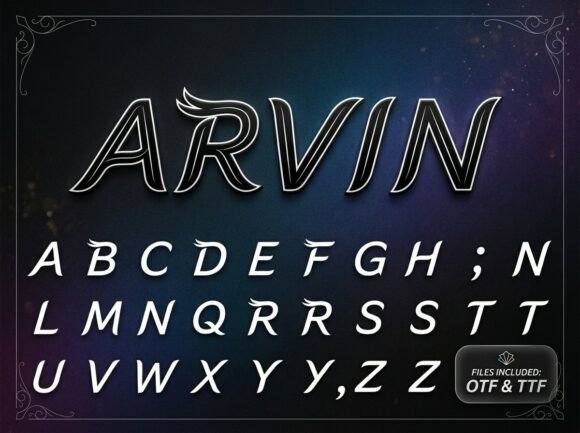
In the crowded world of digital and print media, a font is more than just letters on a page; it is the voice of your brand. Arvin is a modern display font designed to capture the essence of speed, elegance, and futuristic precision. With its slanted, italicized letterforms and sophisticated inline details, Arvin offers a unique aesthetic that blends high-speed aerodynamics with ethereal beauty. However, even the most powerful design tool can fail if misused. To truly harness the soaring imaginative power of this typeface, one must understand not only how to use it, but how to avoid the common pitfalls that plague typography in performance branding.
Understanding the Essence of Arvin
Before integrating Arvin into your workflow, it is vital to grasp its specific personality. This is not a standard workhorse font like Helvetica or Arial. Arvin is characterized by sharp, sweeping wing flourishes that emerge from its terminals and a forward-leaning energy that suggests constant motion. It is a typeface built for high-end sportswear, luxury automotive logos, and futuristic editorial titles. If your goal is to convey a sense of handcrafted precision and speed, Arvin is an exceptional choice. However, if you require a font for long-form body text or formal, static legal documents, this typeface will likely feel out of place and distracting.
The Critical Mistake of Hierarchy and Overuse
The most frequent error creators make when working with a distinctive display font like Arvin is failing to establish a proper typographic hierarchy. Because Arvin features intricate inline details and sharp flourishes, it commands immediate attention. A common misconception is that using a bold, unique font everywhere reinforces the brand identity. In reality, this leads to visual fatigue and makes your content nearly impossible to read.
Imagine a website landing page where the headline, subheadings, and the entire body paragraph are set in Arvin. The "wing flourishes" that look stunning in a headline become a chaotic visual noise when applied to a block of text. This mistake severely impacts usability and communication. Users may leave your site quickly because the cognitive load required to decipher the text is too high.
The Better Approach: Treat Arvin as the star of the show, not the entire cast. Use it exclusively for headlines, logo marks, or short taglines where its aerodynamic elegance can shine. For supporting text, pair Arvin with a clean, highly legible sans-serif or serif font. For example, a geometric sans-serif complements Arvin’s modern structure without competing for attention. This pairing ensures your message is both beautiful and readable.
Context and Brand Alignment
Another oversight is ignoring the semantic weight of the font. Every typeface carries a "vibe," and Arvin’s vibe is undeniably futuristic and fast. A common mistake is applying this font to brands that require warmth, tradition, or quiet simplicity. Using Arvin for a cozy bed-and-breakfast or a traditional legal firm can create a jarring disconnect between the visual identity and the service offered. This misalignment can erode trust and confuse potential customers.
Consider a small business owner launching a line of artisanal, hand-knitted goods. If they choose Arvin for their logo because it looks "cool" or "modern," they risk signaling to customers that their products are mass-produced or synthetic. The sharp, sweeping lines of Arvin suggest machinery and aerodynamics, not wool and comfort.
The Better Approach: Evaluate your brand values against the font's personality. Arvin is the perfect match for performance branding, tech startups, sports teams, and luxury vehicles. If your brand narrative focuses on speed, innovation, or high-end exclusivity, Arvin will amplify your message. Always ensure the typography reflects the product's reality.
Technical Oversights: Licensing and File Formats
For entrepreneurs and freelancers, the excitement of finding the perfect font often leads to skipping the fine print. A significant mistake is failing to verify the licensing agreement before downloading and using Arvin. Many display fonts have different licenses for personal use versus commercial use. Using a font in a client logo or on merchandise without the proper license can lead to legal complications and unexpected costs down the road.
Additionally, technical details regarding OpenType features are often overlooked. Arvin may include alternate characters or specific ligatures that enhance its flowing, aerodynamic look. If you simply type out the text without exploring these features, you might miss out on the font's full potential, such as connecting specific letters to create that seamless "wing" effect.
The Better Approach: Before you buy or download, check the license. If you are working on a commercial project, invest in the commercial license to protect yourself and your client. Once installed, take a moment to explore the font in software that supports OpenType features, such as Adobe Illustrator or InDesign. Experiment with the glyph panel to see if there are stylistic alternates that better suit your specific headline.
Checking File Formats
When sourcing Arvin, ensure you are getting the correct file format for your needs. OTF (OpenType Font) is generally preferred for design work due to its advanced typographic features. TTF (TrueType Font) is also widely compatible. If you are using Arvin for a website, you will likely need a WOFF2 file to ensure fast loading times and compatibility across all browsers. Neglecting to use web-optimized formats can slow down your site speed, which negatively affects SEO and user experience.
Color, Contrast, and Sizing
Because Arvin is defined by its inline details and sharp terminals, it is sensitive to sizing and color contrast. A frequent error is using this font at very small sizes or against a background with low contrast. At small sizes, the intricate "inline" details can blur together, turning a sophisticated design into a muddy, illegible mess. Similarly, placing light grey Arvin text on a white background will wash out the elegant details.
The Better Approach: Reserve Arvin for larger display sizes where the details are crisp and clear. When choosing colors, aim for high contrast. A bold, dark Arvin headline on a light background, or a white headline on a rich, dark image, will make the sweeping flourishes pop. Test your designs on multiple devices—what looks sharp on a high-resolution desktop monitor might look cluttered on a mobile screen.
Practical Application for Better Results
To ensure Arvin delivers a sense of handcrafted precision to your project, follow this checklist before finalizing your design:
- Readability Test: Step back from the screen. Can you read the headline instantly, or do you have to decipher it? If it takes more than a second to read, the font might be too complex for that specific context.
- Pairing Check: Does your body text support or fight with the headline? The supporting font should be neutral to let Arvin's personality stand out.
- Contextual Fit: Does the font match the product? Arvin works for speed and luxury; ensure your brand story aligns with those themes.
- Technical Verification: Have you checked the license for commercial use? Do you have the right file formats (OTF for print, WOFF2 for web)?
By avoiding these common misunderstandings and focusing on strategic application, you can use Arvin to its full potential. It is a powerful tool for creating a memorable, high-impact visual identity that feels both fast-paced and gracefully refined. When used correctly, Arvin doesn't just spell out words; it tells a story of movement and excellence.